Convert CGM to SVG
without redrawing
the original
Convert WebCGM, S1000D, ATA iSpec and ISO 8632 files from a Windows desktop app, or from the command line on Windows and Linux. Runs locally, handles batches of thousands, and flags profile problems before they reach your manuals.
30-day trial · Live preview & validation · Batch processing · 25 conversions/day · CLI on Professional and Enterprise
What we measured,
and how
Line styles and text survive the trip
Preserve line styles, text baselines, and colour mappings across mixed-profile CGM archives without slowing the queue down. Validation runs against the detected profile and can be reviewed before export.
Queue it and walk away
Queue a folder or a release package and walk away. Suited to nightly batches and revision-cycle re-runs.
Validation output you can file
Flag unsupported commands and profile mismatches before the SVG leaves the converter. Files stay on the machine; validation output goes to CSV or JSON for the audit trail.
From input files
to finished SVG
Ingest files or release folders
Drag in a file, or point Reforge at a folder. Works the same during intake or pre-publish.
Apply profile & validation checks
Pick a preset, confirm the profile, and look at warnings before anything converts. Late QA surprises usually start here.
Export the SVG
Write SVG ready for the portal, the manual, or the next step in your pipeline. Same conversion path on the trial as in production.
The conversion engine
is open, and tested in public
Reforge is built on OpenCGM, our CGM parser and SVG emitter, published under the Apache 2.0 licence. The desktop application you buy and the engine anyone can read are the same code. If your organisation has to review what it runs before it runs it, the review can start today, without a procurement conversation.
353 of 353 suite files convert
Every metafile in the WebCGM 2.1 Conformance Test Suite converts under all three output profiles, and every result is well-formed SVG. The script that measures it ships in the repository, so the number can be reproduced rather than taken on trust.
438 of 438 automated checks pass
The suite publishes its own operator checkpoints. Those that can be decided without a human — the metafile is interpreted, the test identifier is rendered — are run on every build and all of them pass. The remaining checkpoints describe what an operator should see and are adjudicated by eye.
Not a conformance certification
WebCGM conformance is defined for viewers, and a converter cannot hold it. We publish what we actually measured instead, including the cases still awaiting visual review. You can read the failures as easily as the passes.
What the converter
actually does
All major CGM standards
Full support for WebCGM 2.1, ATA iSpec 2200, S1000D Issues 4–6, CALS MIL-PRF-28003B, CGM+ (European aerospace/NATO), PIP/CGGC (petroleum industry), and ISO/IEC 8632. Auto-detect identifies the profile from file metadata, scoring against 30+ known CGM-producing tool signatures.
Preserves line styles, text baselines, and colour mappings — the things that usually break when an archive moves between converters.
CLI & batch processing
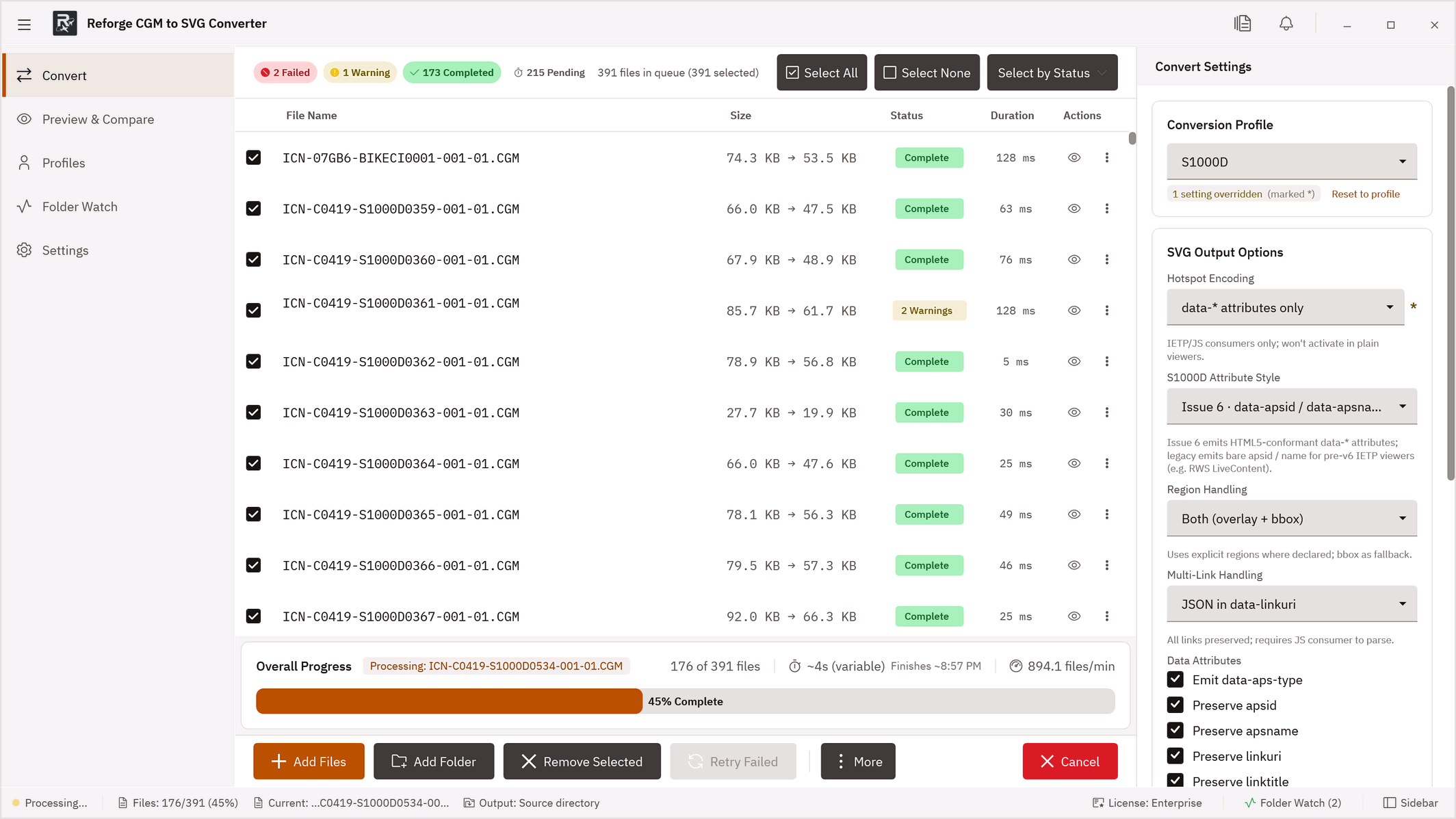
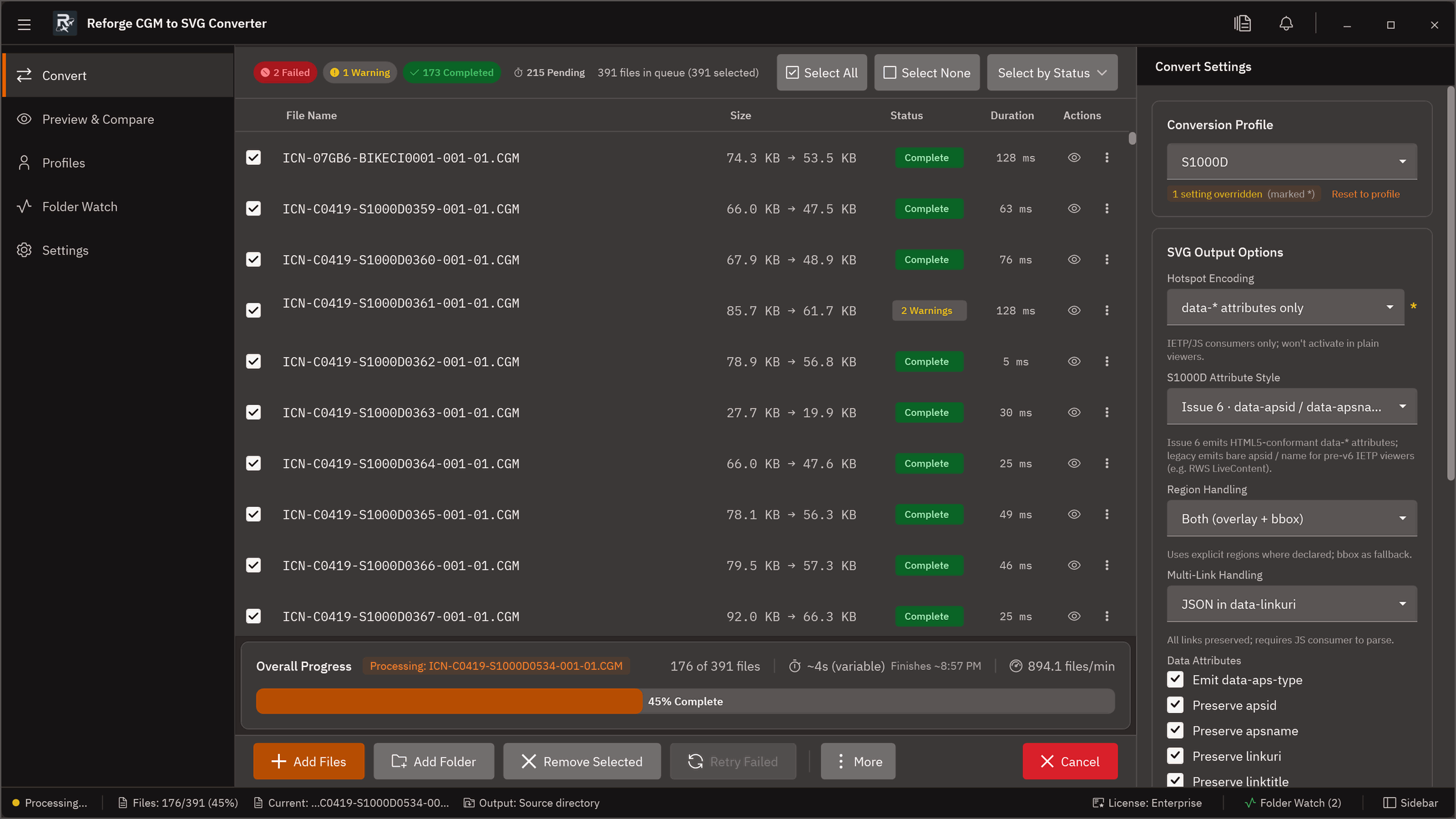
Convert hundreds of files at once. CLI binaries for Windows and Linux fit cleanly into CI/CD, CSDB staging, or any server-side pipeline. Commands emit JSON and use deterministic exit codes (0 = all converted, 1 = all failed, 3 = partial, 10 = licence error).
- Windows + Linux x64 binary
- Professional & Enterprise plans
Hotspot export
Export WebCGM and S1000D hotspot data to JSON, XML, or CSV. Includes APS region metadata, view context, and DM reference attributes — ready for IETM pipelines.
- Ideal for legacy defence archives
- Professional & Enterprise plans
Folder watch
Point Reforge at a folder; anything dropped in gets converted. Common uses: CSDB staging and release pipelines.
- CSDB staging integration
- Auto-convert on file drop
Live SVG preview
Inspect your converted SVG side-by-side with the source. Zoom to 800%, toggle layer visibility, overlay hotspot regions, and export hotspot data — all before saving.
- Four overlay modes: Side by Side, Native Compare, Overlay (onion-skin / difference)
- Measurement tool — SVG units, mm, or pixels
- Layer visibility controls per drawing layer
- Built-in SVG validation with issue explainer
Desktop application
for Windows 10 / 11
Pricing
- 1 seat · 500 conversions/day
- Batch processing
- All CGM standard profiles
- Core validation · no watermarks
- Email support
- CLI automation — not included
- Folder Watch — not included
- Unlimited conversions
- CLI automation (Win + Linux)
- Folder Watch / hot-folder
- Custom CGM profiles
- Advanced validation + hotspot export
- Priority support
- 10+ seats (volume pricing)
- Everything in Professional
- Invoice billing (NET 30/60/90)
- Offline / air-gapped licence
- Dedicated support & SLA
- API access
- Procurement workflow support
| Decision factor | Starter | Professional | Enterprise |
|---|---|---|---|
| Best fit | Solo engineer / writer | Team workflows & batches | Programme-level procurement |
| Seats | 1 seat | 5 → 10 seats | 10+ seats |
| Conversion volume | 500/day | Unlimited | Unlimited |
| Batch processing | ✓ | ✓ | ✓ |
| CLI automation | — | ✓ | ✓ |
| Custom CGM profiles | — | ✓ | ✓ |
| Offline / air-gapped | — | — | ✓ |
| Invoice billing | — | — | ✓ NET 30/60/90 |
| Support | Priority | Dedicated + SLA |
Questions before
you commit?
Technical workflow
resources
CGM to SVG converter guide
Overview of high-fidelity conversion requirements and implementation patterns. Covers profile selection, validation checkpoints, and output format decisions.
Read guide →S1000D and WebCGM workflows
Profile-aware conversion practices for technical publication teams working with S1000D Issues 4–6 and WebCGM 2.1 compliant archives and CSDBs.
Read guide →Batch + CLI automation
How to run repeatable conversion jobs for release-driven environments. Covers CLI flags, Folder Watch configuration, scripting, and CI/CD pipeline integration.
Read guide →Validation and compliance
Validation-first checks to reduce downstream quality and audit risk. Covers pre-export flag review, unsupported construct handling, and compliance handoff documentation.
Read guide →Start your 30-day trial
Get the installer and trial key by email in under a minute.
API access, volume licensing, invoice billing, dedicated support, and custom SLAs for large teams and regulated programmes.